


How to remove location data from photos and videos

Open a photo in your library and look at its information. There may be a map showing exactly where you took it, even though you never wrote a place name anywhere.
Your camera can save those coordinates inside the file. They're useful when you want to find your own holiday pictures later, but they can also travel with a photo you send someone. Covering the face doesn't remove them, just as removing them doesn't hide a house number visible behind your child.
There are three places to deal with: the information in the file, the clues in the picture and sound, and the location you add when you post. Start with the file you're about to share.
What is EXIF, and why does a photo need it?
Metadata is information saved alongside the picture. EXIF is one common format for it: when the photo was taken, which camera took it and, if enabled, GPS coordinates placing it on a map. Video files can hold similar details in their own formats. Checking those details is part of the eSafety Commissioner's advice on children's privacy.
A place shown in a photo app can also come from that app's estimate or a label you added. Removing the label and removing coordinates from the file are different edits, which is why the iPhone and Google Photos steps below differ.
On iPhone: turn off location for the share
In Photos, select the edited photo or video, then:
- Tap Share → Options.
- Turn Location off.
- Tap Done, then choose how to save or share the copy.
If you're using AirDrop or an iCloud link, leave All Photos Data off too. Turning it on can send the original file with its edit history and metadata. For a face you've covered, select a separately exported picture with the cover built in, rather than sending the editing history along with it. Apple's sharing guide explains these options.
That Location switch applies to this share. To remove a photo's location in your library, open it and choose More → Adjust Location → No Location. To stop the camera recording locations in new pictures, go to Settings → Privacy & Security → Location Services → Camera → Never. That future setting won't remove locations from old photos. Apple's location controls
On Android and Google Photos: find out where the location came from
In Google Photos on Android, open the picture and tap More. For an estimated or manually added location, use Edit → Remove location. If the camera recorded the location, Google Photos won't remove it; use a new file export, such as the face-covering workflow below, to leave those tags behind.
For a Google Photos shared album, open Collections → Albums, choose the album, then Share → Options → Share photo locations and turn it off. This changes sharing within that album. It doesn't clean the original file you might later download and email.
Google's location guide explains the distinction, with Android controls here. For future photos, turn off location saving in your Camera app's settings; the label varies by phone manufacturer.
Your private original can keep its map location. The copy you hand out is the one to inspect next.
Check a saved copy without sending it to another website
Save the edited copy in a folder such as Ready to share, with a different name from the original. Open it from that folder so you know which file you're looking at.
On iPhone or iPad, open that copy in Photos and swipe up or tap Info. If it still shows a location you want removed, choose More → Adjust Location → No Location, then check Info again. Apple's metadata guide shows these controls. If you first saved the file in Files, make sure the item you're inspecting in Photos came from that export.
A location-free Info panel is a useful check of what Photos displays, but it isn't a report of every hidden field in a file. Pair it with an export that actually leaves the original tags behind. If the map keeps returning, check that you aren't reopening the original or looking at a location estimated by your library.
For video, play this same saved copy with sound. A GPS-free file can still contain someone saying the address; the audio guide shows how to remove that phrase without cutting the picture.
If you are covering faces as well, our tool saves a new file as part of that edit. On a phone, choose Export, then Download from the finished-copy screen below.
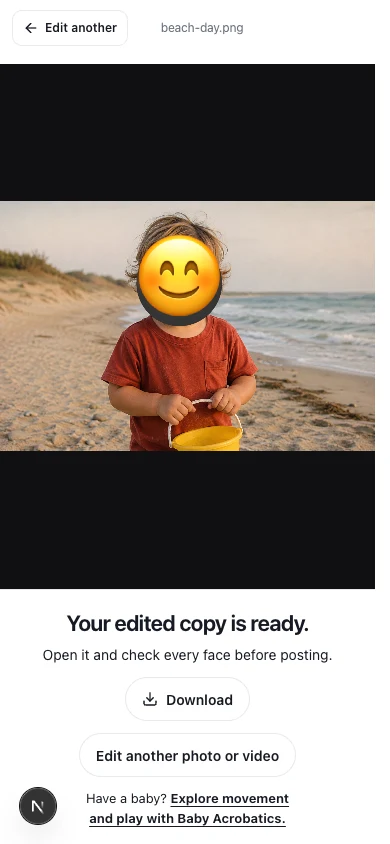 View larger
What our face-covering tool removes
When you cover a face in the Baby Acrobatics tool, the app draws the edited picture and writes a new file rather than copying the original photo's metadata into it. Video export also creates a new file with the covered frames and supported audio.
On desktop, Download saves the edited file. Keep the new copy separate from the original and inspect it using the steps above.
We checked the saved files on September 5 using a JPEG and MP4/WebM videos with deliberately added location, date and device details. The supplied personal tags were absent from the exports, and the videos still played with sound. The checks used Chrome 152 on macOS; the test notes and examples show the files and results.
The new file still has details needed to display or play it, such as width, height and video timing. It also still contains whatever is visible and audible in your footage. Removing the old tags doesn't change either of those, or any original already saved in your cloud library.
For a video, check the sound and the saved file separately
If the clip is on an iPhone, the Share → Options → Location off route above applies to video too. Select the edited clip before opening that menu, especially when the original and covered version sit together in Photos.
If you're exporting from the face-covering tool, save the new file and reopen it from Downloads. The phone download steps help when it doesn't appear in your photo library. Check the location shown for that copy, then play it with sound. Someone saying “we're at…” survives an export that leaves the GPS tags behind.
Changing the filename from .mov to .mp4 won't remove the contents of the file or convert the video. Use an actual export. Our published tag-removal checks cover JPEG, MP4 and WebM samples; they don't establish that every MOV file or every phone takes the same export path.
Check the file, the scene and the post
Once you've removed the stored location, look at the picture you intend to upload:
| Where the location appears | What to do |
|---|---|
| GPS coordinates in the file | Remove location for the share or export a new copy without those tags. |
| A house number, school sign or club name in the picture | Cover it, crop it out or choose footage that doesn't include it. |
| An address spoken in the sound | Mute that phrase or replace the explanation. |
| A location sticker, check-in or caption beside the post | Remove it or leave out the precise location. |
Check this before selecting the file in Facebook or another social app. A social service may process an upload differently from a file sent as an attachment, and it can't remove the school name you've put in your caption for you.
What about a license plate in the background?
A plate gives the same vehicle a recognizable label across different pictures. You may be comfortable showing a car at the beach and less comfortable connecting it to your driveway, your child's school and a regular pickup time. Cover the readable plate if you don't want to make that connection available in your posts.
For a photo, add a cover manually and make it wide enough to hide every character. The tool's automatic scan looks for faces, so it won't reliably find a plate for you. In video, check the plate throughout the shot: if the car or camera moves, a fixed cover can slide off. An editor's tracked mask, such as a Power Window in Resolve, lets you follow that part of the picture and correct it when tracking slips.
This changes the copy you upload. It doesn't change a plate seen by a camera on the road. The Flock guide explains that separate system of recorded sightings and later searches.
The routine can reveal more than the coordinates
A photo at a park may show where one afternoon happened. A post from the same class every Tuesday, with the class name and time, tells people where to expect your child next week.
So look at the wording across your posts as well as in this one. Leave regular schedules out of public captions, and post after you've left if you don't want to announce where you are now. Our Baby Acrobatics demonstrations on Instagram show our children moving while their faces, names and other personal details stay private; a movement video doesn't need a location tag or a weekly schedule to show the movement.
For a clip, finish with the saved-video check. The privacy beyond face blur guide carries this into the other information your family shares.
Sources reviewed 5 September 2026.